Getting started with Liftspan
Liftspan builds you a strength plan around your body, your equipment and your week, then tells you what to lift every session and moves the weight up as you earn it. Setup takes about a minute.
Web or iPhone
Liftspan is the same app in two places. You can use it free in any browser at liftspan.fit/app, or install it on iPhone from the App Store. If you sign in with the same email on both, your plan and history follow you (see account and sync). A few extras, like the streak widget and Apple Health, only exist on iPhone.
The setup questions
- Welcome. Add your first name if you like (it is optional), then tap Start.
- Before you train. A short safety note: talk to your doctor first, pain is a stop sign, and the app adapts but you decide. Tap I understand, I train at my own risk to continue. You only see this once on each device.
- What are you here for? Pick one. It sets your rep ranges and rest times:
- 🔥 Lose fat: 12 to 15 reps, short rests.
- 💪 Build muscle: 8 to 12 reps.
- 🏋️ Get stronger: 4 to 6 reps, longer rests.
- Where are you training? Full gym, home gym, hotel gym, bodyweight only, dumbbells only, bands only, or exactly the equipment you have. Each option shows how many exercises you would get there. More on this in where you train.
- A few numbers. Units, sex, the month and year you were born, weight, height, lifting experience, and how active you are outside training. Liftspan uses these to estimate your starting weights and your daily calorie and protein targets on the Fuel tab.
- Anything to train around? Tap any area that needs care: lower back, shoulders, knees, hips, or wrists and elbows. You can also turn on joint-friendly mode, which is switched on for you if you are 50 or over. This is the part that shapes your plan the most, so it has its own page.
- What do you want to build? Leave it on Full body, or tap the muscles you want to focus on (at least two).
- How many days a week? Two to five. Three is where most people start.
- Tap Build my plan 🏋️.
Your first week
If you finish setup on a Monday, Week 1 starts right away. On any other day, the rest of this week is a warm-up week, and Week 1 starts next Monday. You can train during the warm-up week, and it is a good time to learn the lifts and find your weights.
The first time you open Today, a short tour points out the main parts of the screen. Tap Skip tour to skip it. You can replay it any time: tap the 🏅 You tab, then the ⚙️ gear at the top for Settings, then 🧭 Show me around again.
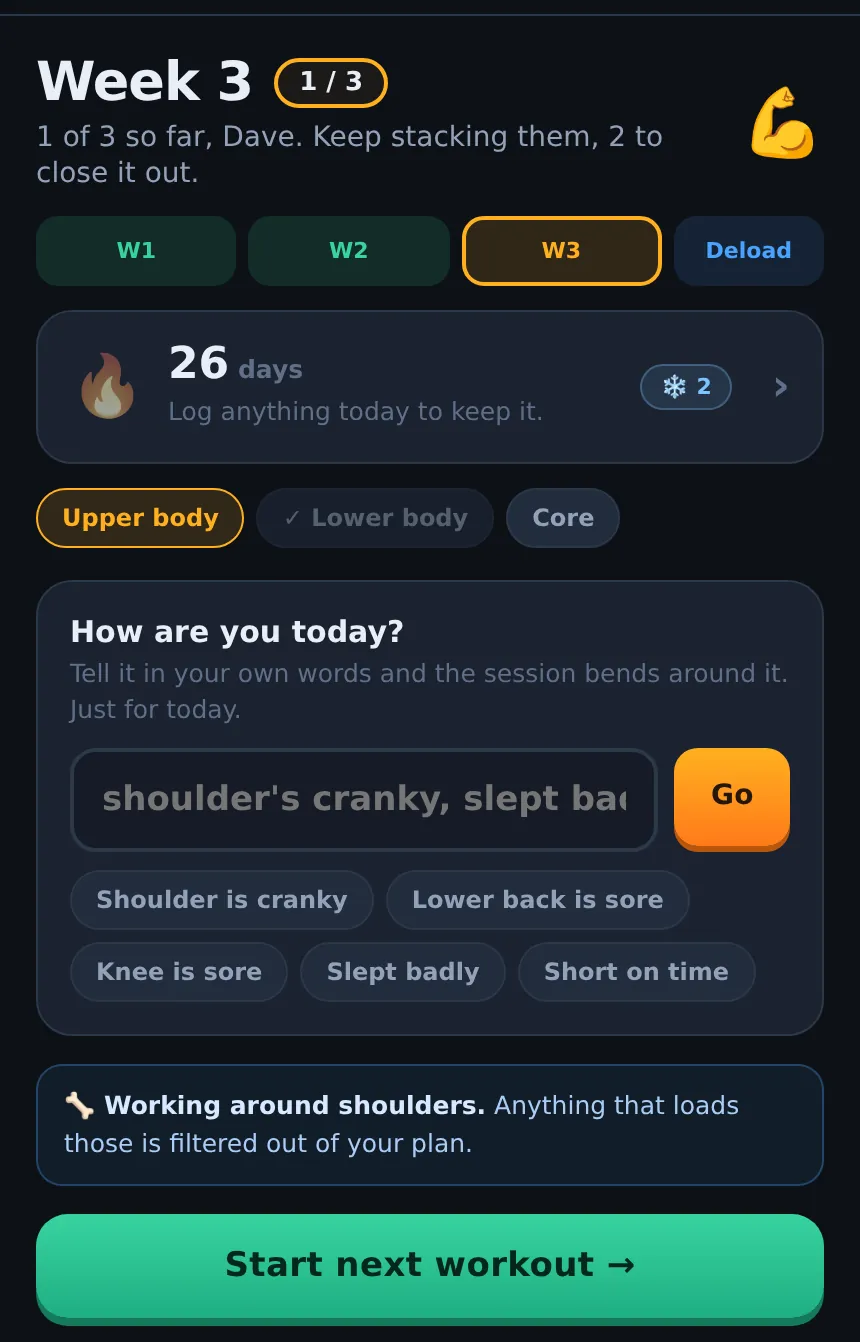
Finding your way around
| Where | What it is for |
|---|---|
| 🏠 Today | This week, today's session and the button to start it, your daily streak, and the daily check-in. |
| 🗺️ Plan | Every day of your week, your program, and everything you have logged. |
| The round flame button | Your streak page: the daily flame, freezes, a calendar and streak partners. |
| 🍽️ Fuel | Your calorie and protein targets and a body weight log. |
| 🏅 You | Your level and badges, the muscles you train, the joints you work around, your training settings, Progress, and the ⚙️ Settings gear. |
Along the top you will always see your level, your XP and your daily flame 🔥. On a phone you can also swipe left and right to move between tabs.
Do I need an account?
No. Everything works without signing in, and your training is saved on the device you are using. Signing in (with a one-time code by email, no password) backs your training up, lets you use Liftspan on more than one device, and is needed for streak partners. See your account, sync and deleting your data.
What is free and what is Pro
Free covers the essentials for good: logging every workout, a plan built around your joints and equipment, the three starter programs, the daily streak and one streak partner, the widget, levels and badges, sync and full export. Pro is the coach in full, including the daily check-in, swapping exercises, building your own programs, switching training rooms, the Progress screen, and on iPhone, Apple Health and rest alerts on your Lock Screen and Apple Watch. Pages in this manual mark Pro features with a PRO tag. Prices are on the pricing page.
Common questions
Can I change my answers later?
Yes. Your goal, days per week, experience, equipment (switching rooms is part of Pro), muscles and joints are all on the You tab under Training and Working around. Some changes rebuild your plan, so read how each one works on its help page before you change it.
Why does Liftspan ask for my age and weight?
To pick sensible starting weights, to switch on joint-friendly mode from 50, and to estimate your calorie and protein targets. It stays in your account and is never shown to streak partners.
Is Liftspan medical advice?
No. Liftspan is a training tool. If something hurts, stop, and talk to your doctor before starting a training program.